Private customer accounts for every shop
Each merchant has their own customers, sign-ins, carts, orders and purchase history. A customer account belongs to that shop—not a shared customer pool across your platform.
Get the complete white-label platform: Super Admin, web and mobile management, storefront engine, native Android and iOS app generation per shop, AI infrastructure and source code. Sell subscriptions to your users (merchants). Each runs an isolated shop with their own shop branding, products and customers—while you operate the full platform under your branding.
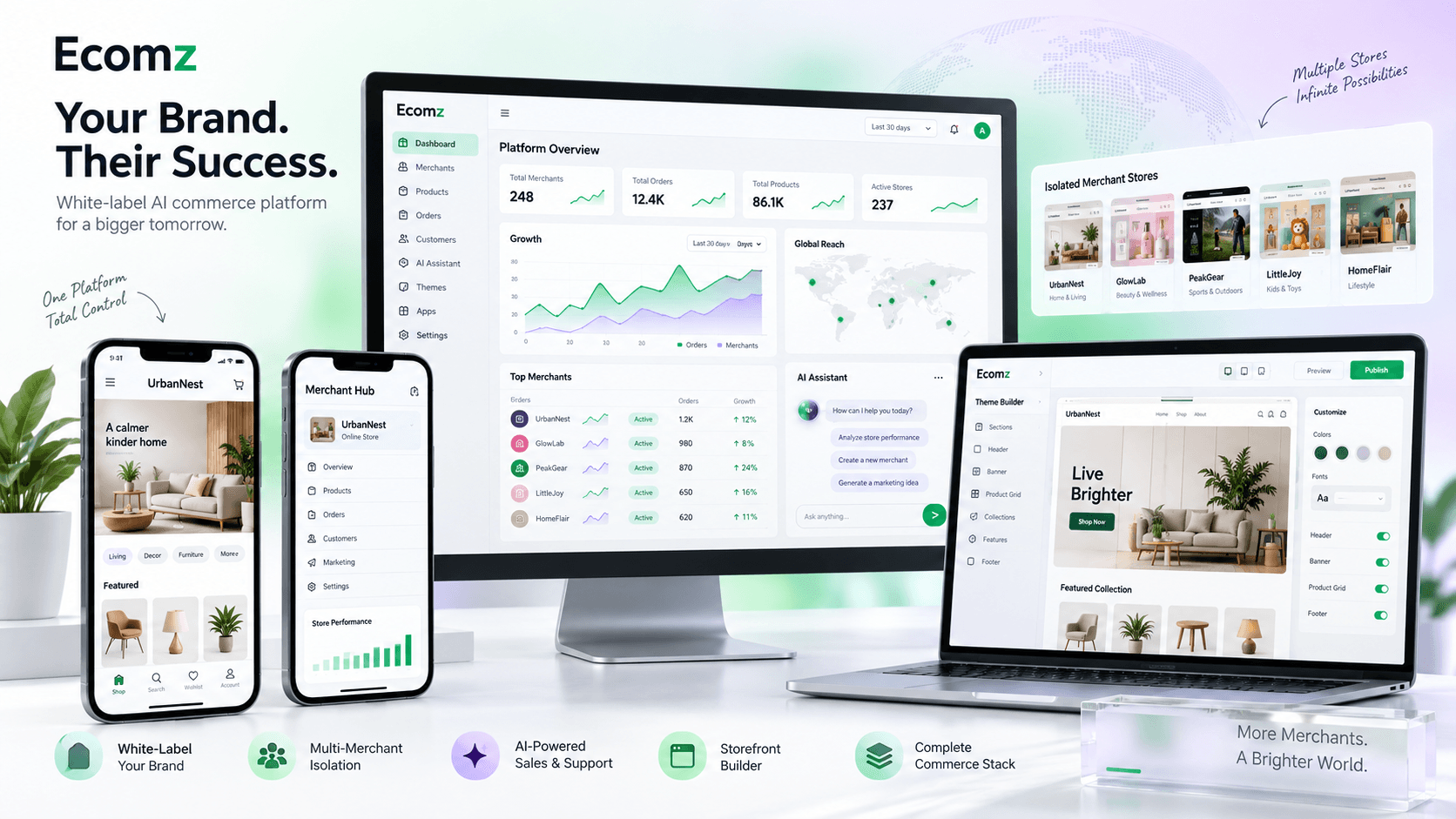
Launch the AI commerce solution under your brand, serve the merchants in your area and establish your position before slower competitors catch up.
Each merchant has their own customers, sign-ins, carts, orders and purchase history. A customer account belongs to that shop—not a shared customer pool across your platform.
Every shop’s AI employee works with that shop’s products, FAQs, policies and knowledge. The storefront chat widget and native shopping apps bring that assistance directly to its customers.
Connect website chat, apps, WhatsApp, Facebook Messenger, Instagram and Telegram. AI handles conversations using the shop’s knowledge; the merchant can take over in the same inbox, with history kept private to that shop.
You operate the full platform under your business branding. Your users (merchants) each operate an isolated shop under their own shop branding. Each shop’s customers use only that shop’s storefront and native shopping apps.
Manage your users (merchants), subscriptions, invoices, plans and per-shop app orders from your platform-owner workspace.
Explore this layerOpen a shop’s iOS order, click Build iOS and let the Mac app build and upload to that shop’s App Store Connect account.
Explore this layerYour users (merchants) manage each isolated shop’s products, orders, stock, customers and settings in one web workspace.
Explore this layerLet your users (merchants) operate their own shops from Android: orders, catalogue, reports, notifications and shop controls.
Explore this layerThe connected iPhone management experience keeps each shop’s daily operations available away from the desk.
Explore this layerGenerate dedicated Android and iOS shopping apps per shop, with that shop’s name, icon, products and native storefront layout.
Explore this layerGive every shop an independent website, domain, catalogue, cart, checkout and customer accounts—not a marketplace profile.
Explore this layerFixed themes, dynamic starters, custom pages and AI-assisted drafting let each shop publish its own layouts and content.
Explore this layerShop-specific metadata, search-friendly pages, sitemaps, product feeds and supported marketing pixels help each shop reach its customers.
Explore this layerNode.js commerce services connect catalogue, orders, checkout, subscriptions, domains and app workflows with shop-scoped access.
Explore this layerDeploy on your cloud or VPS with containerised services, routing, storage and cache configuration under your control.
Explore this layerAuthentication, realtime chat and push-notification services connect the web and mobile channels while preserving shop scope.
Explore this layerWebsite, app and supported social conversations connect to each shop’s inbox, with conversation history and human handover.
Explore this layerEach shop’s AI employee uses its own products, policies, documents and authorised tools, with retrieval, indexing and provider credentials.
Explore this layerPostgreSQL stores operational records; Redis, BullMQ and workers handle builds, indexing, webhooks and messaging in the background.
Explore this layerScale compute, database capacity, storage, caching and workers as your users (merchants), traffic and job volumes grow. Capacity needs planning and monitoring.
Explore this layerOnboard unlimited users (merchants) under your platform licence. Actual shop capacity depends on your infrastructure and service resources.
Explore this layerSet the packages and local prices your users (merchants) pay you. Each shop’s customer payments remain separate from your platform subscriptions.
Explore this layerAdd 136+ payment choices, 141+ courier connections and 81+ SMS gateways. Each shop connects the providers selected for its business.
Explore this layerChoose the complete SaaS platform on its own or add Ecomz Appstore. Then apply your brand, connect the services selected for your market and begin onboarding users (merchants).
Multilingual interfaces connect the merchant web portal, Android and iOS management apps, storefront websites and native shopping apps per shop. Your users (merchants) choose their interface language; each shop controls its storefront language independently.
Browser and device language preferences help your users (merchants) start in a familiar interface.
Arabic, Persian and Urdu include right-to-left direction support across the customer-facing and merchant interfaces.
Storefront language is shop-specific. Changing one shop’s setting does not change other shops or the platform’s users.
37 language and regional options, ready for your next market. Each shop keeps control of its own products, pages and business content.
Ecomz gives you the connected system to operate a Wix- or Shopify-style B2B platform under your identity. You sell merchant subscriptions; each merchant runs an isolated branded store and sells directly to each shop’s customers.
Your business controls its licensed platform deployment. Your users (merchants) each run an isolated shop under their own shop branding.
Receive a non-exclusive source licence
Control branding and plans
Keep subscription revenue
Host on your cloud
Their own shop branding
Own products + orders
Each shop’s customers
AI employee per shop
Native Android + iOS apps per shop
Isolated shopTheir own shop branding
Own products + orders
Each shop’s customers
AI employee per shop
Native Android + iOS apps per shop
Isolated shopTheir own shop branding
Own products + orders
Each shop’s customers
AI employee per shop
Native Android + iOS apps per shop
Isolated shopTheir own shop branding
Own products + orders
Each shop’s customers
AI employee per shop
Native Android + iOS apps per shop
Isolated shopDeploy on your domain, servers and connected accounts.
Set monthly or yearly merchant subscription packages.
Each shop runs its own brand, customers and operations.
Acquire and retain merchants while your infrastructure scales.
Your customers are your users (merchants). Each shop’s customers buy from that shop. You acquire and support your users (merchants); they attract, fulfil orders for and support each shop’s customers.
Every shop has its own shop branding, domain, pages, banners and supported native app layouts. Your platform identity belongs to the service you operate—not a shared consumer storefront.
Products, categories, variants, prices and inventory remain scoped to each shop. One shop does not manage another shop’s catalogue.
Customer accounts, customer records, carts and purchase history belong to the relevant shop. A customer of one shop is not automatically a shared customer of other shops.
Each shop receives and fulfils its own orders, uses its own provider accounts, and controls its delivery settings, policies and customer service.
Each shop’s AI employee uses that shop’s authorised products, knowledge and tools. Its conversations and human-support inbox stay scoped to the shop.
Shop-scoped access separates settings, content and operational records. Your platform team administers the service; your users (merchants) run their own shops and serve each shop’s customers.
For companies, independent founders and non-technical business owners ready to launch their own branded commerce platform. Bring your market knowledge and local relationships; use the included AI setup guidance or choose professional setup to get started.
Turn engineering and local market knowledge into a merchant-subscription product without starting from an empty repository.
Move from one-off client projects to a platform offer with onboarding, subscriptions, integrations and ongoing merchant success services.
Launch for one country, language or business niche with local payments, delivery and support as the competitive advantage.
Add a higher-value commerce SaaS layer around infrastructure, deployment and managed-service relationships.
Enter the store-builder category with a working product ecosystem and spend the next phase on positioning, sales and retention.
Deploy a controlled ecosystem for your users (merchants), franchisees, members and distributors under your platform branding.
Start your own platform business around a market you understand. Build relationships with your users (merchants), offer useful local plans and grow from a focused first group of isolated shops.
Lead the business, local sales and support without writing the platform yourself. Use the included setup guidance with a technical partner, or commission professional deployment and ongoing infrastructure care separately.
Build your recurring revenue around the plans your users (merchants) choose. Add onboarding, native apps per shop, AI packages and local support to create an offer worth staying for.
Create plans around products, domains, apps, AI, storage, analytics and support. Recurring revenue is active merchants multiplied by your chosen plan price.
Charge for branding, initial configuration, product import, domain connection, team training and launch assistance.
Package Android and iOS customer-app generation, publishing coordination and store-listing assistance as a premium service.
Offer the dedicated AI employee, knowledge preparation, channel connection and performance review inside higher-value merchant plans.
Sell setup for regional payment, courier, messaging, email, tax and business-service providers your market already trusts.
Provide platform care, merchant success, reporting, training, performance guidance and priority response through ongoing service plans.
Offer storefront campaigns, custom workflows, analytics reviews, new modules and market-specific development when merchants need more.
You do not need a worldwide launch on day one. Win a specific merchant segment, make onboarding repeatable, retain the first cohort and scale from evidence.
Start with one geography, language or merchant category where your team understands payments, delivery and buying behaviour.
Lead with the outcome: website, native shop apps, commerce operations and AI support under the merchant’s own brand.
Set clear monthly or yearly tiers, publish a credible demo and prepare a guided onboarding path for early merchants.
Use direct sales, agencies, business groups, events, search and social advertising to win businesses—not each shop’s individual customers.
Improve merchant activation, add local services, sell premium packages and scale compute, data and workers as usage grows.
Your offer is Ecomz under your own platform branding. Give your users (merchants) a clear reason to choose it: useful features, approachable daily tools, local pricing, familiar providers and hands-on support. Each shop keeps its own shop branding and its own customers.
Set charges for your market and explain what is included. Compare the full recurring cost—not only a headline subscription.
Offer guided setup, local-language help and practical training so your users (merchants) can start operating confidently.
Package an independent storefront, native apps per shop, daily operations and a shop-specific AI employee in the plans you choose.
| What matters | Shopify | Wix | Your branded platform · powered by Ecomz |
|---|---|---|---|
| Subscription cost | Shopify sets its plan prices; paid apps and payment-related charges may add to the bill. | Wix sets its plan prices; capabilities and additional app costs depend on the selected services. | You set local subscription prices and package the features your users (merchants) need. Include your hosting, AI, support and provider costs when setting those prices. |
| Local payments & charges | Available providers and third-party transaction fees depend on the market, plan and payment setup. | Payment-provider availability depends on the business location and provider setup. | Set plans around local budgets and supported billing currencies instead of copying an international pricing model. Each shop uses its own supported provider accounts. Processing and currency-conversion fees may still apply. |
| Shop design & mobile apps | Hosted store design and commerce tools; additional requirements may involve apps or development. | Website building plus an available Android/iOS app-building product; check its plan and publishing requirements. | Storefront building plus native Android/iOS app generation per shop. Each app uses its own shop branding, with dynamic shop layout and content sync. |
| Integrations | An established app ecosystem; individual apps can have separate charges. | An app ecosystem and payment-provider connections; scope and charges vary by service. | An optional, growing 358+-module catalogue: 136+ payment choices, 141+ couriers and 81+ SMS gateways. Match supported providers to your local market. |
| Setup & everyday use | Managed platform with commerce tools, themes and support resources. | Managed website and business platform with visual building tools. | A connected web/mobile workspace for your users (merchants), plus the local onboarding, language, training and support service your business provides. |
| Who operates the platform? | Shopify operates the hosted service and sets its platform terms. | Wix operates the hosted service and sets its platform terms. | You operate Ecomz under your platform branding, with source code and infrastructure control. Your team remains responsible for reliability, security, backups and support. |
Comparison covers standard hosted offers. Features and charges vary by country, plan and provider.
You deploy Ecomz under your company name, domain and cloud. You create monthly or yearly plans and sell them to product-based merchants in the market you understand. Every subscribed merchant then runs an independent branded commerce business for each shop’s customers.
Use your company identity, domain, infrastructure, merchant plans and local sales strategy.
Charge the monthly or yearly prices you choose and add onboarding, app, AI or support packages.
Each of your users (merchants) receives private products, orders, customers, storefront content, settings and AI knowledge.
Each shop’s customers use that merchant’s website and native apps—not a shared marketplace or the platform owner’s store.
Do not sell a confusing list of software modules. Sell the result: one merchant subscription can give a business its branded storefront, mobile operations, customer apps, AI assistance and the daily tools needed to process real orders.
Show the journey in the same order a merchant experiences it: publish the storefront, add a product, place a test order, manage it from web or mobile, then demonstrate the shop-trained AI employee and human handover.
Custom domain, pages, themes, SEO, product catalogue, cart and checkout
Products, categories, variants, stock, orders, customers, invoices and settings
Run products, orders, customers, reports, alerts and the AI inbox on Android and iOS
Dedicated native Android and iOS shopping apps using their own shop branding and live shop data
Product-aware sales and support, shop knowledge, social channels, inbox and human takeover
Merchant-controlled checkout, cash on delivery, courier assignment and optional provider catalogue
Promo codes, visitor analytics, reports, SEO, Meta/TikTok pixels and customer accounts
Separate store data, credentials, customers, domains, content and AI knowledge for every merchant
Bring retailers, product brands, digital businesses and online sellers onto your branded platform. Start with a market you know, build a strong local offer and expand with your users (merchants).
We provide the Ecomz AI setup skill and deployment guide with your licensed delivery. Use it with a compatible coding agent—such as Codex or Claude Code—to work through the full platform setup on your laptop, cloud or VPS. ChatGPT or Claude can also help explain the guide; running deployment steps requires an agent with access to your files and environment.
Give your coding agent the supplied Ecomz repositories, skill and setup documentation in your own workspace.
Provide your domain, hosting and required service accounts securely. Keep secret keys in server-side configuration, never in public frontend code.
Let the agent help install dependencies, configure services, prepare the database, deploy the platform and apply your branding—with your approval.
Test sign-in, shop isolation, checkout, email, AI, backups and a complete demo shop. Then begin onboarding your users (merchants).
Your AI-assisted launch starts with your hosting, domain and service accounts. Follow the setup skill, review the launch checklist and choose optional professional support when you need it.
When your server or laptop, domain, brand assets, database and required service accounts are ready, the included AI setup skill and documentation can guide a focused staging launch. Production timing still depends on your infrastructure, credentials, testing and any customization.
Open the licensed delivery, review the architecture, prepare environment values, database, storage, email, Firebase and the provider accounts required for your first market.
Run the guided deployment, apply your platform identity and domain, create merchant plans, configure one demo merchant and complete the launch checklist.
Use the live demo flow to approach a focused merchant category, show the full merchant offer and start guided onboarding with qualified businesses.
Pick one country, city or category where businesses already sell through physical shops, social media or basic websites. Interview prospects, identify their payment and delivery pain, and package one clear local offer.
Brand the platform, connect the services your first segment needs, publish one complete demo store and offer guided onboarding to a small founding cohort. Use their objections to improve your plans and sales proof.
Collect approved case studies, build an onboarding checklist, create referral and agency offers, run targeted outreach and advertising, and track demos, activations, retention and monthly recurring revenue.
Add another merchant category, region or premium service only after the first offer converts. Scale infrastructure with usage, keep onboarding consistent and reinvest in merchant success.
Do not spend your first budget trying to attract every shopper in the country. Market the platform directly to the businesses that need a better way to sell online.
Build a list of retailers, wholesalers, product brands and social sellers; lead with a live demo built for their category.
Give web, marketing and IT partners a reason to refer or onboard merchants instead of delivering one-off websites.
Demonstrate the website, native apps and AI employee through chambers, trade associations, local events and founder communities.
Target business owners looking for ecommerce websites, online ordering, shop apps or a way to move beyond social-only selling.
Reward active merchants for introducing another qualified business, then make the new merchant’s first setup fast and guided.
Publish category-specific comparisons, live store tours and practical guides that show exactly how a merchant will sell and operate.
Start with accessible £5, £9, £15 or £25 monthly plans. Give your users (merchants) a compelling local offer and build recurring revenue, one shop at a time.
Example monthly subscription revenue
Example monthly subscription revenue
Example monthly subscription revenue
Example monthly subscription revenue
Example monthly subscription revenue. Choose your plans and grow at your own pace.
Explore your owner dashboard, then see the real merchant, storefront and mobile application screens. Follow the product from managing a shop to helping its customers buy.
Keep your business in view: track platform revenue, manage your users (merchants), review subscriptions and invoices, set pricing, publish announcements and follow app orders per shop.
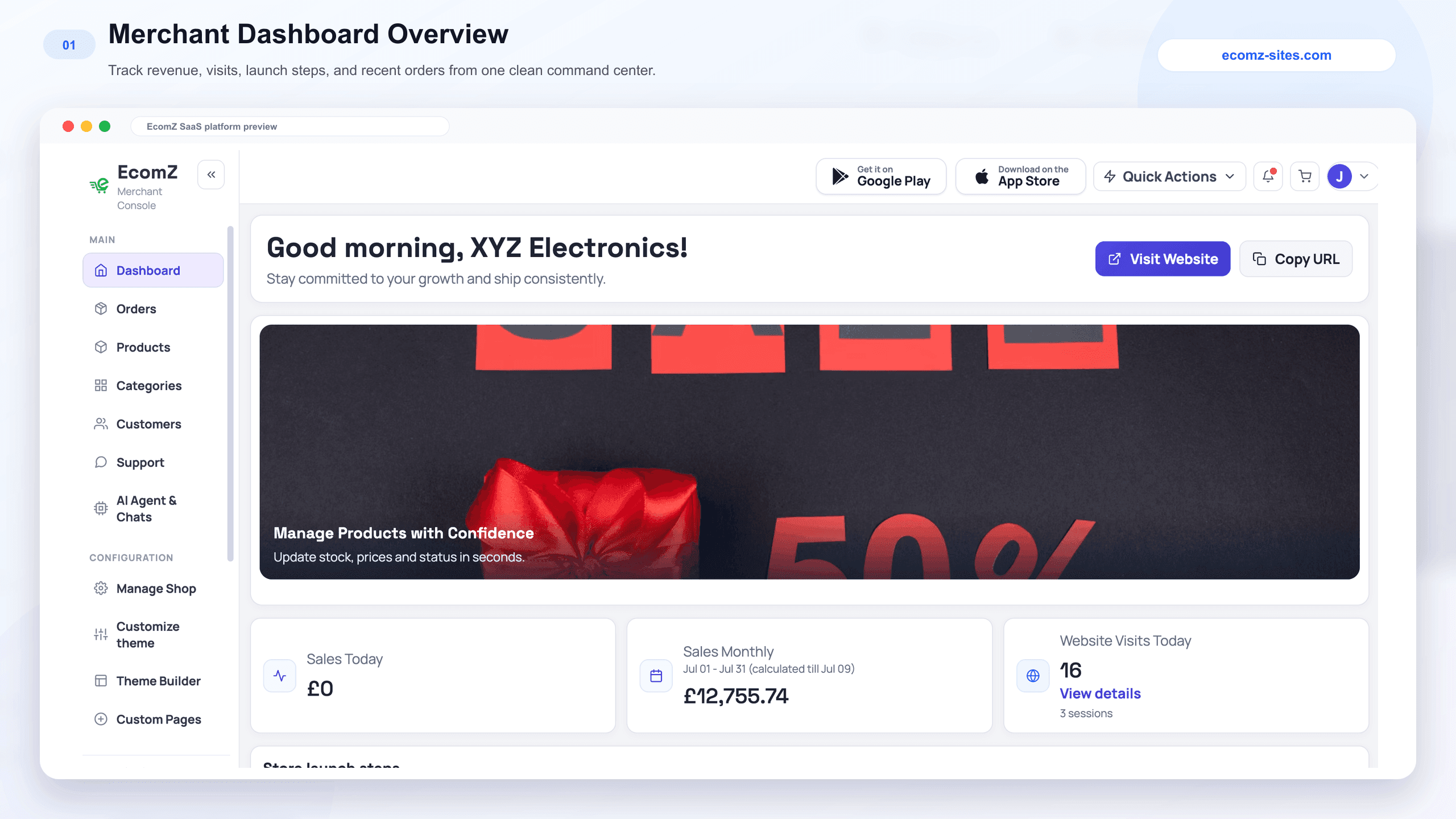
Each of your users (merchants) signs in to their own business. The dashboard brings today’s sales, recent activity, website visits and launch tasks into one place. They can open the storefront, finish shop setup and move into orders, products or customers from the same navigation.

Explore the tools your users (merchants) will use every day.
Your users (merchants) can search and filter orders, create an order, open its details and update its status. Customer information, purchased products, payment status and delivery details stay together, so the team can handle follow-up without rebuilding the order history across separate tools.

Explore the tools your users (merchants) will use every day.
A merchant’s team can maintain the catalogue directly: add products and images, write descriptions, organise categories and brands, set prices and manage stock. The detailed editor keeps product content, availability and search information together, ready for the connected storefront and customer app.

Explore the tools your users (merchants) will use every day.
Your users (merchants) can begin with a fixed theme or choose from the dynamic industry library. The custom Theme Builder lets them arrange sections, choose component variants and edit settings alongside the storefront preview. They can work on navigation, banners, product sections and page content before publishing.

Explore the tools your users (merchants) will use every day.
Merchants are not limited to their homepage. Dynamic page starters and the custom page editor let them build product launches, seasonal offers and business pages. AI-assisted drafting accepts a brief and business context; the merchant reviews and edits the result before publishing it under the shop’s identity.

Explore the tools your users (merchants) will use every day.
Each shop’s customers can move from category and brand discovery into a detailed product journey with galleries, variants, live stock, discounts, quantity controls and checkout. Campaign pages, reviews, trust messages, product sharing and AI assistance stay inside that shop’s branded experience—not a shared marketplace listing.

Explore the tools your users (merchants) will use every day.
The merchant management apps bring the shop’s daily work to a phone. Owners can check orders, browse their product catalogue, review customers and reach reports and shop controls. Keep daily operations connected wherever business takes them.

Explore the tools your users (merchants) will use every day.
Offer your users (merchants) dedicated Android and iOS shopping apps per shop, using their own shop branding. Each shop’s customers can browse products, discover recommendations with AI and manage their accounts in one native experience. Products, page content and supported storefront layouts stay connected to the merchant’s shop.

Explore the tools your users (merchants) will use every day.
Each shop configures its own assistant: its name, welcome message, business context and knowledge sources. Products, FAQs, policies and documents help it answer relevant questions and recommend products. The merchant can review conversations and take over when a shopper needs a person.

Explore the tools your users (merchants) will use every day.
The Social Connects screen brings WhatsApp, Facebook Messenger, Instagram and Telegram into the merchant’s AI and messaging setup. Connected channels use that shop’s agent settings and knowledge. The social inbox then gives the merchant conversation history, product context and the option to take over the reply.

Explore the tools your users (merchants) will use every day.
Android and iOS use different build workflows. For Android, the merchant queues a build from the web panel; the automated cloud pipeline generates APK/AAB files and makes them available in Build History. For iOS, the merchant places an order, then the platform owner opens the Super Admin Mac app and clicks Build iOS to build and upload to that shop’s App Store Connect account.

Explore the tools your users (merchants) will use every day.
Your users (merchants) can review sales, orders and product performance, export records and inspect website activity. SEO and marketing settings bring supported tracking tools into the same shop configuration, so they can measure campaigns alongside their store’s performance.

Explore the tools your users (merchants) will use every day.
Each of your users (merchants) manages the details that make the shop theirs: business identity, domain, email, policies, delivery charges and supported payment methods. Their platform subscription and billing history are available from the merchant panel, separate from the orders placed by each shop’s customers.

Explore the tools your users (merchants) will use every day.
The Appstore add-on expands the platform with payment, courier and SMS provider catalogues. Merchants connect their own accounts and credentials. Browse the separate Appstore page to see the provider cards and links; the base platform and the integration bundle are clearly separated in pricing.

Explore the tools your users (merchants) will use every day.
Alongside the product screens, your users (merchants) get the practical tools that keep each isolated shop organised, connected and ready to sell.
Organise each shop’s catalogue with categories, brands, variants, prices and stock, ready for its website and native apps.
Give each shop promotional codes for its own campaigns, with the discount and validity controls available in the merchant panel.
Connect shop events to external workflows through configurable endpoints, event subscriptions, signing and delivery history.
Manage WhatsApp message templates alongside Social Connects and the shop-specific omnichannel inbox.
Spot low-stock products, daily and monthly sales, top sellers and website visits from the shop dashboard.
A practical launch checklist covers shop details, domains, products, categories, themes, email, publishing, tracking and order operations.
Support daily operations with order details, invoices and receipts, manual order creation and exportable reports.
Connect supported GTM, Meta Pixel and TikTok tracking to each shop’s own storefront and campaigns.
Two separate workflows create shop-branded native apps. Android runs automatically in the cloud from the merchant panel. iOS starts with a merchant order and is built by the platform owner through the Super Admin Mac app.
The merchant saves the Android app name, package name, icon and splash settings, then clicks Queue Android APK/AAB Build. The job runs automatically in the cloud—not in the Super Admin Mac app. The merchant can close the page and return to Build History for the downloads.
About 10 minutes through the automated pipeline. Build time depends on the queue and cloud resources. No Mac or Super Admin build click is required for Android.
The platform owner opens the ready-made Super Admin Mac app, selects the merchant’s iOS order and clicks Build iOS. With the shop’s Apple configuration ready, the Mac app handles the build, archive and automatic upload to that shop’s App Store Connect account—without manually archiving or uploading the app.
One click. Built and uploaded for that shop. Build iOS in your Mac app; Android runs in the cloud. Apple review follows submission.

Follow each shop’s iOS order from setup to App Store Connect.
The Appstore is not included in the base SaaS licence. Choose the £459 bundle to add 136+ payments, 141+ courier connectors, 81+ SMS gateways and future Ecomz Appstore add-ons delivered through your business account. We are adding more daily.
Explore the separate Appstore pageThe £309 option is the complete white-label SaaS business engine. The £459 option includes the same platform plus the separate 358+-module Ecomz Appstore catalogue.
Bring the core systems of a commerce SaaS business together in one non-exclusive licence: your owner dashboard, merchant tools, storefronts, native apps per shop and AI infrastructure. Operate and modify your licensed copy under your brand.
The isolated foundation that lets your users (merchants) run independent shops under your platform.
Your owner workspace for users (merchants), plans, subscriptions, announcements and app orders per shop.
A connected workspace for each shop’s products, orders, customers, reports, content and support.
Keep each shop’s operations moving from Android and iOS, wherever business takes your users (merchants).
Independent websites, custom pages, themes, domains and SEO under each shop’s own branding.
Android and iOS apps per shop, with their own shop branding, dynamic native layouts and connected commerce.
Shop-specific sales and support with product knowledge, connected channels and human handover.
AI-assisted deployment guidance, licensed delivery and ongoing access to Ecomz updates.
The complete platform’s £79,999 Ecomz package valuation plus £19,001 in Appstore value brings the bundle to £99,000. Get 358+ integrations and future Ecomz Appstore additions alongside the full platform.
Access your licensed downloads, documentation and future Ecomz product updates from one business account.
Lifetime free Ecomz updatesUse the included AI setup skill and structured guide with a compatible AI coding assistant to prepare a laptop staging environment and work through deployment.
Designed for AI-assisted installationFollow the system overview, environment checklist, deployment sequence and operating guidance supplied with the licensed source repositories.
A clear path from delivery to launchHost and modify the agreed platform delivery on infrastructure you control, under your brand and domain, without receiving Ecomz intellectual property ownership.
Non-exclusive extended business useComplete your licence purchase through secure Stripe Checkout.
Access the source delivery, setup skill, documentation and lifetime updates.
Use the AI-guided checklist yourself or purchase separate professional setup and customization.
Configure your identity, domain, merchant plans and the service accounts required for your market.
Launch a demo, start targeted B2B acquisition and guide the first merchants to activation.
Host the platform on your own cloud or VPS. The web apps, mobile apps and AI services connect through the commerce backend; databases and background workers handle the operating work. Here is what each layer does.
Next.js and modern React experiences power the public storefront and web products with server-rendered, search-friendly delivery.
React Native supports the merchant management applications and generated customer-shopping apps for Android and iOS.
Node.js services connect products, customers, orders, checkout, subscriptions, domains, analytics, AI and platform administration.
PostgreSQL supports dependable operational records while tenant-aware access keeps every merchant’s permitted data separated.
Redis, BullMQ and dedicated workers move builds, webhooks, AI indexing, messaging and document jobs away from customer-facing requests.
RAG, vector search, Pinecone-compatible retrieval and merchant-scoped live tools ground the AI Employee in authorised shop knowledge.
Firebase and Google Cloud integrations support identity, mobile configuration, push notification and connected application workflows.
Docker-based services, NGINX/CDN caching paths and environment configuration support owner-controlled cloud or VPS deployments.
REST APIs, merchant webhooks and the optional Appstore catalogue support custom workflows and third-party provider connections.
Choose the production infrastructure, connected accounts, capacity, backups, monitoring and operating policies that fit your platform business.
Choose the complete SaaS platform or add the growing Appstore catalogue. Pay once for your licence, receive lifetime free Ecomz updates and build your business under your own platform branding.
Receive a non-exclusive licensed copy of the complete white-label platform, deploy it under your brand and sell recurring merchant subscriptions.
Start with the complete platform and the integration catalogue merchants expect across payments, delivery and transactional messaging.
Prefer Softexpoit to handle installation, infrastructure, branding, customization or launch support? Tell us the market, hosting plan and changes you need; we will quote that work separately from the software licence.
Browse the 47 merchant web screens and the connected Android, iOS, iPad and shopper-mobile applications included in the platform experience.
Step into your future platform: explore the owner dashboard, run a demo shop, browse its storefront and try the connected Android and iOS apps.
Click through the real Super Admin story to understand the platform-owner side of the business before purchase.
Open full-screen owner tourExternal tours, stores and app listings open from their official review destinations. Demo content, credentials and availability can be refreshed as the product evolves.
These answers cover licence rights, merchant acquisition, data isolation, native apps, AI, payments, recurring revenue and the optional Ecomz Appstore package.
Compare the two licencesThe platform includes 37+ language and regional options across the merchant web portal, Android and iOS management apps, storefronts and native shopping apps per shop. On the marketing site, visiting the root URL automatically selects the closest supported browser language; a visitor can then change language manually and that choice is remembered. Arabic, Persian and Urdu include right-to-left support. Interface localization does not automatically translate each shop’s product descriptions or custom content.
You deploy Ecomz on infrastructure you control, apply your brand and domain, create monthly or yearly plans, and acquire merchants. Each subscribed merchant receives an independent branded store environment. You collect the merchant subscription revenue while merchants sell to and support each shop’s customers.
No. Ecomz is a white-label multi-tenant store-builder platform. Your customer is the merchant. Each of your users (merchants) operates an independent online business and acquires each shop’s customers; stores do not share one marketplace, customer base or sales account.
The licence does not impose a merchant count. Practical capacity depends on your servers, database, traffic, storage, caching and cloud configuration. Start with a smaller deployment and scale to multiple servers as your merchant base grows.
Yes. Products, categories, inventory, customers, accounts, orders, invoices, branding, domains, payments, delivery settings, analytics, AI knowledge, support conversations and mobile apps are isolated at shop level with no cross-merchant data access.
A merchant can receive a branded responsive storefront, custom domain or platform subdomain, web dashboard, merchant management apps, branded native customer apps, visual page builder, isolated commerce operations, analytics, SEO and a dedicated AI sales and support employee.
Yes. Each app uses the merchant’s shop name, app name, logo, brand colours, products, categories, banners, page layouts, business information, policies, customer accounts, carts and orders. The two build workflows are separate: Android APK/AAB generation runs automatically in the cloud from the merchant panel, typically in about 10 minutes depending on queue and resources; it does not require the Super Admin Mac app. For iOS, the merchant places an order, then the platform owner opens the Super Admin Mac app and clicks Build iOS. The Mac app builds, archives and automatically uploads to that shop’s App Store Connect account. Publishing requires your own Google Play and Apple Developer accounts. Store content and supported native layouts remain dynamically connected after the build.
No. Storefront layout, UI, banners, colours, products, categories, content and business data remain dynamically synchronised. The apps include the native store-builder rendering engine and render updates with native mobile components. They are not WebViews, wrapped websites or browser-based apps.
Yes. Each of your users (merchants) can configure a shop-isolated AI Employee trained live on authorised products, details, policies, FAQs, orders, knowledge-base content and documents using RAG and vector search. It can recommend products, answer questions, support verified order enquiries and hand conversations to humans.
Yes. Configure prices, billing periods, product limits, domains, mobile apps, AI access, analytics, storage and premium features. Merchants pay through the subscription gateway configured for your platform, and the revenue reaches your account subject to that provider’s fees.
Each of your users (merchants) markets their own website, apps, products and brand through channels such as social media, search, WhatsApp, email, influencers and offline advertising. The platform owner markets Ecomz as a B2B SaaS product to merchants.
Not necessarily. Ecomz is designed for recurring SaaS subscriptions rather than mandatory marketplace commission. You can also sell onboarding, mobile-app generation, integration, premium support and maintenance services.
Yes. Retailers and sellers operating through Facebook, Instagram, TikTok or WhatsApp can launch a professional branded storefront and native shopping apps, then direct their existing audience to their own commerce channel.
Your users (merchants) connect their own supported gateway credentials. Payments from each shop’s customers are processed through that shop’s provider account, so the platform owner does not have to collect and redistribute every shop’s sales revenue.
The £309 base purchase is the Ecomz SaaS Extended Business Licence: the complete white-label multi-tenant platform source and included business resources. The optional £459 bundle adds the separate 358+-module Ecomz Appstore catalogue.
No. Ecomz provides the technology and operating infrastructure. Platform growth depends on your merchant acquisition, service and retention, while each merchant remains responsible for pricing, marketing, fulfilment and customer relationships.
Your customers are your users (merchants): retailers, brands, agencies, social sellers and other businesses that subscribe to your ecommerce platform. Each shop’s customers belong to that shop’s business relationship—not a shared platform audience.
No. You acquire and support merchants. Each of your users (merchants) promotes its own products, website and mobile apps and remains responsible for shopper acquisition, fulfilment, returns, communication and customer relationships.
The individual merchant receives and manages orders placed through that merchant’s storefront and apps. Order processing, inventory, delivery, customer communication and returns stay within that shop’s isolated environment.
Yes. You can begin with one country, language, payment ecosystem or merchant category, acquire initial subscribers, refine your offer and scale into more markets and verticals over time.
Market the business outcome to merchants: a professional ecommerce website, branded native shopping apps, catalogue and order management, local payments and delivery, analytics, SEO, AI sales and support, and a unified workspace for operating their store.
Connect the domain, cloud, Apple Developer, Google Play, supported AI provider, email, payment, courier and messaging accounts selected for your platform and merchant offer.
The shop can display a service warning and route the conversation to the merchant’s human-support inbox. The merchant remains in control of its own AI account, billing and usage limits.
Yes. The merchant management applications support onboarding, products, orders, customers, reports, notifications, business settings and AI conversations from Android and iOS devices.
No. The 136+ payment, 141+ courier and 81+ SMS modules are part of the optional Ecomz Appstore package. Select the £459 bundle to add the complete catalogue and receive future Ecomz Appstore add-ons through your business account.
Yes. Ecomz can change licence prices and campaign offers. Review your selected package and the final amount on secure checkout before paying.
Once checkout is available, our server will verify the payment with Stripe before showing Payment received and the verified payment reference. You will then sign in to your business account. Downloads are not unlocked automatically: Ecomz will arrange the licensed delivery and account access after reviewing the order.
Your business account remains entitled to future Ecomz product updates released for the purchased licence, giving you one place to access the licensed delivery, documentation and ongoing Ecomz releases.
It is a structured instruction package designed for use with a compatible AI coding assistant. It helps your technical operator understand the repositories, check prerequisites, prepare environment values, work through local or laptop staging, deploy services and verify the main platform flows.
Yes. Use a suitable laptop or workstation for development or staging so your team can inspect, configure and test the platform before moving the launch configuration to your chosen production environment.
No. A non-technical founder can lead the business, sales and merchant experience while an experienced engineer, an AI-assisted technical operator or Softexpoit handles the technical setup and operations.
Yes. Softexpoit can prepare a tailored proposal for full setup, infrastructure configuration, branding, custom development, market-specific changes, integrations, data work, launch assistance and training.
Pay securely through Stripe. Your payment confirmation will include a verified order reference, with licensed delivery arranged through your business account. Online checkout is being prepared; contact us to arrange your purchase.
Choose a market where you can name the merchant problem clearly and reach decision-makers: one city, country, language or category such as fashion retailers, electronics shops, social sellers, restaurants or wholesalers. Confirm the required payment, courier and communication providers before packaging the first offer.
Build a focused prospect list, create one complete demonstration store for that category, and contact business owners through direct outreach, local agencies, freelancer partners, chambers, trade groups, events and targeted search or social campaigns. Sell a guided outcome—not a list of source-code features.
Lead with the merchant result: their own branded ecommerce website, optional native shopping apps, product and order management, local payment and delivery options, analytics and a shop-trained AI sales and support assistant—all managed from one connected workspace.
Show the complete journey: branded storefront, product discovery, cart and checkout, order appearing in the merchant dashboard, product and customer management, mobile operations, storefront editing, native app experience and an AI conversation that can hand over to a person.
You control the plans. A practical structure is a simple entry plan for website and core operations, a growth plan for domains, analytics and higher limits, and a premium plan for branded apps, AI or priority service. Validate prices against local alternatives and your support cost rather than copying a global vendor blindly.
In days 1–30 choose a segment and validate its problems. In days 31–60 brand the platform, configure the essential local services and onboard a small founding cohort. In days 61–90 turn objections and results into a repeatable demonstration, onboarding checklist, referral offer and measured acquisition process.
Track activation: product catalogue completed, domain connected, payment and delivery configured, storefront published and first order received. Provide onboarding checkpoints, useful reports, responsive support, training, campaign guidance and premium services that help the merchant keep using the platform successfully.
Yes. The £459 bundle includes the current 358+-module Ecomz Appstore catalogue and future Ecomz Appstore add-ons made available to that licence through the business account.
No. The SaaS Extended Business Licence is non-exclusive. Your advantage comes from your brand, local merchant relationships, positioning, service, integrations, execution and retention—not from exclusive ownership of a geography.
Yes. You can rebrand and modify your licensed platform copy for your business, add your own plugins and integrations, create your own merchant plans and onboard unlimited merchants subject to your infrastructure. You control and operate your deployed version. The licence is non-exclusive and does not transfer Ecomz intellectual property: you may not resell, share, redistribute or hand over the source code or a source-code copy to a third party.
No. You receive a non-exclusive licensed copy of the source and the right to operate and modify that copy for your own white-label SaaS business. Ecomz and its licensors retain the underlying intellectual property. Your own branding, market positioning, merchant relationships and separately created original custom work remain yours, while the licensed source cannot be resold, shared or handed over.
The platform supports normal catalogue and operational data workflows, but a specific migration depends on the format, quality, size and source system. Treat bulk migration, cleanup or custom import tooling as a scoped technical task; Softexpoit can quote it separately if required.
Prepare your brand, domain, first merchant plans, selected service accounts, one demonstration shop and the sales and onboarding process you will use for your first market.
Choose the direct Ecomz licence, complete payment securely through Stripe and deploy a serious merchant-subscription business under your own identity.